todo: make saving a post offline obvious, not a line of small text #meta #todo
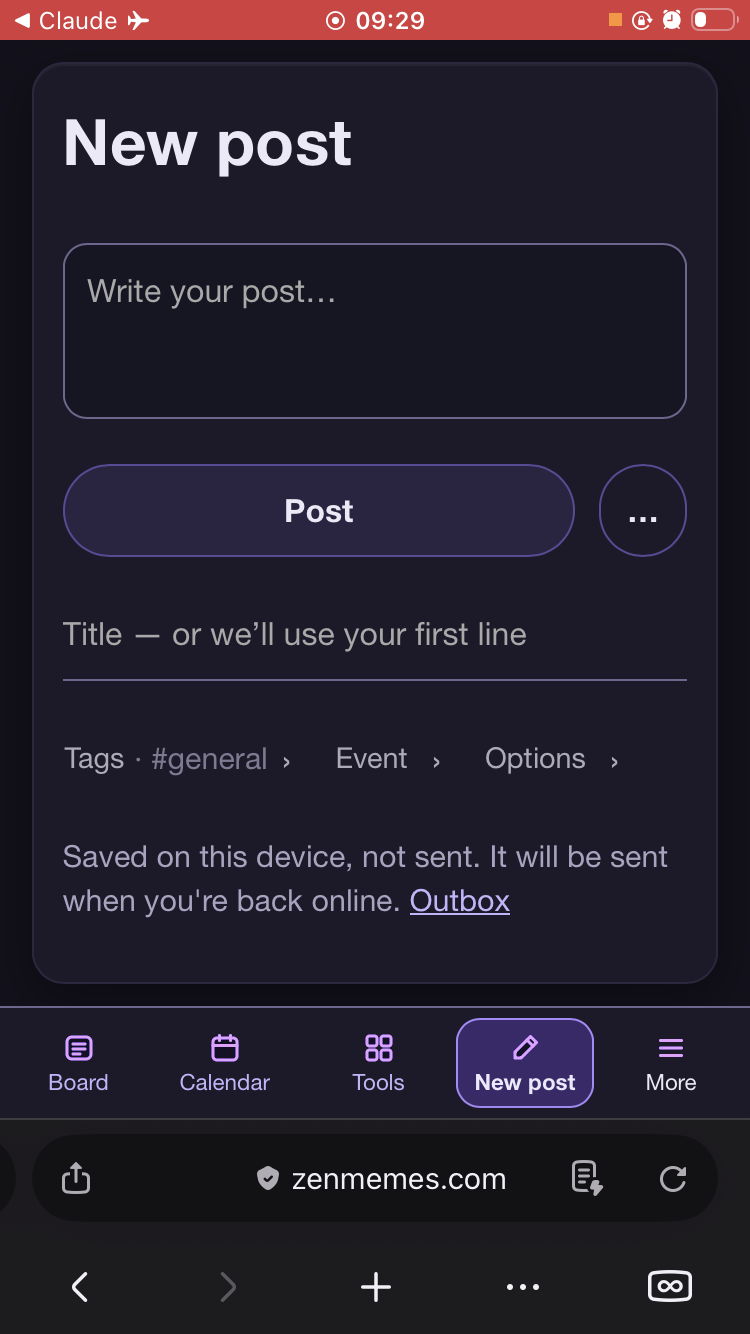
When you press Post offline, the only sign that it worked is a line of small text under the form: "Saved on this device, not sent." It's easy to miss, so it's not obvious whether the post went anywhere. Ilya took a screenshot of it; it didn't make it to me, so please attach it here.
What done looks like:
Saving offline is as clear as a successful post online. The form clears and something unmistakable says the post is saved on this device and waiting to send.
The message says what happens next (it goes out when the connection is back) and links to the Outbox.
Here's Ilya's screenshot, on a phone with the dark theme. After pressing Post offline, the form clears and the only feedback is the grey line at the bottom, under the title, tags, event and options rows. It's below everything you'd look at, in the same colour as the hints.
Phone screenshot of the ZenMemes New post page offline in a dark theme. The form is empty; at the bottom, below Title, Tags, Event and Options, small grey text reads: Saved on this device, not sent. It will be sent when you're back online. Outbox.